

And, you can use it in your own projects! Did you know that?!
Well, it's not exactly hidden if you can use it and people know about it, eh?
Let's dive into it...
- Basic concepts and super simple base example
- The very basics of writing handlers
- Let's add graceful stop command
- Bundle your mini web app into the release jar and serve it from there
- Super-duper simple basic authentication
- How you could make authentication more complicated (and useful)
- This thing also has filters and filter chain
- There's HTTPS support too
- There's a simple file server that comes with JDK that uses these same classes (duh)
Java has what is known as a "standard library" which consists of a large number of packages that come with JDK. All packages in standard library have names that start with java. or javax. or org. and these are considered public, supported, standard packages that you may code your applications with and be certain they'll be available wherever a Java runtime is installed.
And then there are the non-standard, unofficial or hidden packages. These usually contain implementation of public interfaces or some utility classes used by a specific JVM implementation or a tool that comes with JDK (like javac) or JRE (like jar). You may or may not have seen code that imports those packages whose name starts with sun. or com.sun., and if you have, that code is officially known as non-portable code. That means that the code may or may not run on a machine other than the one that it is compiled on, and if maybe that is not the case, and it can run on most machines having JRE installe, there is a substancial chance that the code may stop running when the next Java update comes out, let alone when the next version comes out.
Being internal implementation details and prone to suddenly disappearing in the next update, using classes from packages whose names start with sun. or com.sun. and which are part of the JDK or JRE internals, was usually frawned upon.
You can find more words and sentences about this whole thing here but the most important sentence from that FAQ is this:
"The java.*, javax.* and org.* packages documented in the Java Platform Standard Edition API Specification make up the official, supported, public interface."
And you can and should use classes from those packages to code your applications. All the other ones you can find in an JDK/JRE implementation, you should avoid.
Except for a few exceptions.
It turns out that there is a bunch of internal packages which proved to be generally useful to developers creating various tools for Java. And come Java 9 and introduction of modules, these useful packages were given kind of official blessing. Java modules, among other things, brought strict encapsulation with them which meant that you could not access willy-nilly private or protected members/classes using reflection. So, these useful com.sun. packages were placed into their own modules having names starting with jdk. and got an official blessing for developers to use them. You can find list of these jdk. packages here by selecting the "JDK" tab.
This has been documented in the JEP 403: Strongly Encapsulate JDK Internals, and if you scroll down to "Exported com.sun APIs" title you can find this:
Most
com.sun.*packages in the JDK are for internal use, but a few are supported for external use. These supported packages were exported in JDK 9 and will continue to be exported, so you can continue to program against their public APIs. They will, however, no longer be open.
For package to be "open" means "code can access their non-public elements via reflection", so "no longer be open" means you won't be able to access non-public elements for these classes via reflection.
Which is perfectly fine for us, we just want to use their public API anyhow.
So let's get started, shall we?
Basic concepts and super simple base example
Here's the 10,000 meters (yes) overview of how you make an app using classes from jdk.httpserver module:
- Create server instance
- Create context for each URL path you want to handle
- Create and attach context handler to each context
- Start the server
Context handlers will process requests, create responses and server will send the responses to clients and that's it.
This is how the above looks like converted to code:
import com.sun.net.httpserver.HttpServer;
import com.sun.net.httpserver.HttpHandler;
import com.sun.net.httpserver.HttpExchange;

import java.io.IOException;
import java.io.OutputStream;
import java.net.InetAddress;
import java.net.InetSocketAddress;

public class BasicHttpServer {

  public static class HelloWorldHandler implements HttpHandler {
    @Override
    public void handle( HttpExchange exchange ) throws IOException {
      // Construct response body
      byte[] response = "Hello world from Java HTTP server!\n".getBytes();
      // set response header(s)
      exchange.getResponseHeaders().add("Content-Type", "text/plain");
      // send response headers
      exchange.sendResponseHeaders( 200, response.length );
      // write body
      OutputStream os = exchange.getResponseBody();
      os.write( response );
      // to finish processing close the stream
      os.close();
    }
  }

  public static void main( String[] args ) {
    try {
      //
      // 1. Create server instance
      //
      // Option 1: bind to localhost, use fixed port
      // HttpServer server = HttpServer.create( new InetSocketAddress( InetAddress.getLoopbackAddress(), 8000 ), 0 );
      // Option 2: bind to localhost, have server choose random free port
      HttpServer server = HttpServer.create( new InetSocketAddress( InetAddress.getLoopbackAddress(), 0 ), 0 );

      //
      // 2. Create context for each URL path you want to handle
      //
      var ctx = server.createContext( "/" );

      //
      // 3. Create and attach context handler to each context
      //
      ctx.setHandler( new HelloWorldHandler() );

      // HINT: you can also do 2. and 3. in one step like this:
      // server.createContext( "/", new HelloWorldHandler() );

      //
      // 4. Start the server
      //
      server.start();

      System.out.println(String.format(
        "Server running at: http://%s:%s/",
        server.getAddress().getHostString(),
        server.getAddress().getPort()
      ));

      } catch(IOException e) {
          e.printStackTrace();
      }
  }
}
Once you comiple and run the above code, you should see a message like this:
Server running at: http://127.0.0.1:39483/
and when you open the URL in browser, you should see something like this:
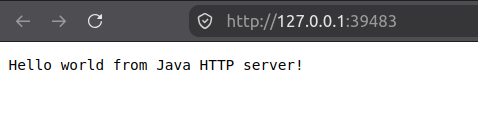
You can also use cURL:
$ curl -i http://127.0.0.1:39483/
HTTP/1.1 200 OK
Content-type: text/plain
Content-length: 35

Hello world from Java HTTP server!
and see all the response details (by using -i option) that way. We can see that the Content-type header we set is there, and we can also see that HTTP status code is 200 and Content-length header is there, which were both set by the call to sendResponseHeaders().
Nice!
But wait! There's more!
The very basics of writing handlers
The meat and potatoes of your HTTP server will be in context handlers. A handler is a piece of Java code that implements the com.sun.net.httpserver.HttpHandler which looks like this:
public interface HttpHandler {
  public abstract void handle ( HttpExchange exchange ) throws IOException;
}
You can provide an implementation of a context handler by:
- implementing
HttpHandlerinterface in a class, and then providing an instance of that class as a context hander, or - providing a lambda that has one parameter of type
HttpExchangeand returnsvoid
You can see an example of the first option in the previous section, and I'll provide an example of the second option in the next section.
When client makes an HTTP request to our server, the server will match the request path to the list of registered context paths, and will then choose a proper context to handle the request. You can find details on how request URIs are mapped to HttpContext paths here.
The context associated with the matched path then calls the handler we registerd to it. There are optional steps that happen before and after handler is called, but that is for next sections. One thing that is important to know about coding handlers is that everything you have to work with the request you need to process and the response you want to send, is contained within the HttpExchange parameter passed in to your handler. So, in very general terms, the typical interaction of your code with the HttpExchange parameter goes something like this:
getRequestMethod()to determine the HTTP request method.getRequestHeaders()to examine the request headers, if you need to and if there are any.getRequestBody()to get anInputStreamfor reading the request body. After reading the request body, you should callclose()on the stream.getResponseHeaders().add()to set any response headers, exceptContent-Length, that is done by callingsendResponseHeaders().sendResponseHeaders(int,long)to send the response headers. Must be called before the next step.getResponseBody()to get anOutputStreamto send the response body. When response body has been written, you should callclose()on the stream to terminate the exchange.
Few notes:
- you MUST set ALL the response headers with
getResponseHeaders().add()BEFORE you callsendResponseHeaders(int,long) - you MUST call
sendResponseHeaders(int,long)BEFORE you write to theOutputStreamreturned bygetResponseBody() - you MUST call
close()method on theOutputStreamreturned bygetResponseBody()otherwise the client will never receive complete response from the server
And one tip:
- you can simply call
HttpExchange::close()method when you want to finish processing the request, that method will callclose()on bothInputStreamandOutputStreamof theHttpExchange
Allright, now that we have a basic understanding of the concepts around the "hidden" Java HTTP server and a super simple example code running...
Let's add graceful stop command
When you start the server in console, it simply starts and then sits there, waiting to serve client requests. In order to stop the server you have to send SIGINT signal (on Linux, and the equivalent on other platforms) to it in order to stop it, which is done by using Ctrl-C key combination in the terminal running the server.
We can do better than that: we can add a dedicated context to shutdown our server when request is made to the context path, which we will, surprisingly, name /stop.
Also, I want to complicate things a bit by throwing in an additional feature: multi-threaded request servicing. This is important not only because you may want to service requests in their separate threads, but also because there are a few nuances in what you must do to stop the server which are directly relate to multi-threaded request servicing.
Let us first quickly talk a bit about servicing requests in their separate threads.
Servicing requests in spearate threads
When you create and start a server the way we did it in the example above, calling start() method will create a server thread which will the server run in, and once the thread is started, start() method returns. It does not block waiting for the server thread, it returns, and the thread starts running in the background. That's why the call to System.out.println() whe have in there after start() will print its thing and you can see the message in terminal informing you about the URL that our server is serving on and that you can open in a browser. Out main() method ends after that, but the JVM keeps running and your terminal will not close, because there is still that server thread running in the background, and by default JVM waits for all thread to finish before it exits. If you want JVM, and the server, to stop and exit, you need to interrupt it with Ctrl-C (or Cmd-C on Mac).
Started this way, the server will only have one thread and it will server all client requests on that one thread. You probably don't want this if you are going to use it for anything more demanding.
To have the server use separate threads to service client requests, we need to create instance of an Executor: an object that executes submitted Runnable tasks. Then, we pass this instance to our server before starting it, and the server will use this executor instance to schedule and execute context handlers that service client requests. The original thread created by start() method will still be there, it is used to wait and accept client requests as before, however, now it won't execute appropriate context handler right away, it will schedule it for as a task on the executor.
There are a few Executor implementations provided with JDK, and you can find more out there, for our exampel we will use one of the simplest ones: a fixed size ThreadPoolExecutor which we will create using Executors.newFixedThreadPool(int) static factory method. This will create an executor with a fixed number of threads to execute tasks on, and having an unbounded queue where incoming tasks can wait for their turn when all the threads are busy.
Creating and using this executor is as simple as adding this line of code:
server.setExecutor( Executors.newFixedThreadPool( 4 ) );before the server.start() line. This creates ThreadPoolExecutor instance with 4 threads, which means our server will be able to concurrently server 4 client requests, and if more requests come in while it is still serving those 4, they will be placed in a task queue and serviced as soon as one of the 4 threads becomes available. This all happens in the background, all you need to do is add that line of code above.
Gracefully stopping the server
OK, now let's see how to gracefully stop the server. You may want to do this because:
- you want to allow already running request handler to finish their job,
- you want to have a nice user experinece by providing i.e. "Stop" button on a web page served by your server,
- etc.
You stop the server itself, it's server thread, by calling the stop(int) method on the instance, i.e.:
server.stop( 5 );This will close the listening socket and the method blocks until all current exchange handlers have completed or else when approximately, in this particular case, 5 seconds have elapsed, whichever happens sooner.
If you haven't created and used an Executor for your server, this is where the server, and JVM, will exit, and you are done.
However, if you have created and used an Executor, this will stop the server, but it won't stop the JVM. Reason for that is that the executor is still keeping those, in our example case, 4 threads alive, they are waiting for work to be done, that will never come it way, and so JVM just sits there waiting for those threads to finish, which will never happen. You may think this as a silly behaviour: why doesn't stop(int) method also shutdown the executor? Because the stop(int) method implementation follows the pattern of responsibility where you only manage lifecycle of objects you create, and don't mess with lifecycle of objects that are created by someone else (in this case by us by calling Executors.newFixedThreadPool()). If you do create and object and expect some other code to manage its lifecycle, that should clearly be stated in your class/method javadoc, and example of that we have in the code we wrote above: server creates InputStream and OutputStream stream for handler (your code) to read from / write to, and it expects your code to call close() on those streams in order to signal end of processing. Calling close() on Closeable is considered a lifecycle event.
Nice!
So, if you have used an executor, you will need to stop the server and shutdown the executor, like so:
import java.util.concurrent.Executors;
//
// ... more code here, and then...
//
var execsrvc = Executors.newFixedThreadPool( 4 );
server.setExecutor( execsrvc );
//
// ... more code here, and then, in the method that stops the server...
//
server.stop( 5 );
execsrvc.shutdown();
Note how we used two-liner instead of one-liner to set executor for our server, because we need reference to the executor instance in order to shut it down later on. I mean, duh. The ExecutorService::shutdown() method will stop the executor from accepting new tasks, but it will not wait for already running and submitted tasks to complete. However, once all the tasks are complete, it will stop the task threads, which means there will be no threads for JvM to wait for.
Also, important thing here is that you should first call server.stop() and then call execsrvc.shutdown(), otherwise server may accept a new client request and attempt to schedule it for execution when the executor is shut down and is rejecting new tasks, which will result in an exception.
The final thing, accompanied by one more little gotcha, is implementing handler for /stop context. Let's start with this version and then I'll address the little gotcha:
//
// ... some code here, and then...
//
var execsrvc = Executors.newFixedThreadPool( 4 );
server.setExecutor( execsrvc );
//
// ... more code here, and then...
//
server.createContext( "/stop", (/* HttpExchange  */exchange) -> {
  // This is how you send the "204: No Content" response:
  // code is 204 and length is -1, which means "there will be no content",
  // and that tells the context to emit "Content-Length: 0" header
  exchange.sendResponseHeaders( 204, -1 );
  // Call close() to signal end of request/response processing
  exchange.close();

  // And now to stop the server
  server.stop( 5 );
  execsrvc.shutdown();
});
Just like we already learned, we create a new context and this time, as promised, we use the second variant of creating a handler: by using a lambda. The lambda code is simple: send 204 (no content) response to client, terminate exchange, and then stop the server and the executor.
It is, however, deceptively simple. The little gotcha I mentioned is this: the code that calls stop() and shutdown() is a handler code. This means that this code is running on one of the executor's task threads. If you recall, stop() will block waiting for all handlers to finish, and since stop() is called by the /stop handler, the handler will be blocked, which blocks stop() since it waits for the handler to finish, which is not yet done since it is waiting for stop() to return, and.... you know... it is your classic, run-of-the-mill deadlock.
To prevent this deadlock, we need to exit the /stop handler and call stop() and shutdown() from somewhere else. Seasoned Java devs already know where this leads: the good old new Thread(...).start(); construct. Or, using the latest and greatest Java features, we'll call Thread.startVirtualThread(...), but you have to keep in mind that startVirtualThread() is only available since Java 21. In our case, either one of the constructs will work, and I'll just go with the startVirtualThread() one. So, the proper /stop handler would look something like this:
server.createContext( "/stop", (exchange) -> {
  exchange.sendResponseHeaders( 204, -1 );
  exchange.close();

  // launch the actual shutdown thread
  Thread.startVirtualThread(() -> {
    server.stop( 5 );
    execsrvc.shutdown();
  });
});
and in case you didn't use executor, i.e. you are using single-threaded server, the handler would look like this:
server.createContext( "/stop", (exchange) -> {
  exchange.sendResponseHeaders( 204, -1 );
  exchange.close();

  // launch the actual shutdown thread
  Thread.startVirtualThread( () -> server.stop( 5 ) );
});
In this way, we are using the /stop handler to launch an actual server shutdown procedure in a separate thread. The handler will then exit, and at some point in time (very quickly) the launched shutdown thread will call stop() and shutdown() completely separately from the entire server-executor dance, no deadlocks to be had. And by the time the shutdown thread has finished and stopped, the server has stopped, all handlers are completed, the executor has shut down and since there are no more tasks (stop() waited for them to complete) it has also stopped all its task threads and JVM will simply exit.
Smooth like hot butter.
Now that we know how to create a server, set up context paths and handlers for them, make the server more responsive by servicing requests in their own threads, and how to cleanly shut down the server, it is time to...
Bundle your mini web app into the release jar and serve it from there
Starting with Java 21, the jdk.httpserver module already contains a class named SimpleFileServer as well as a CLI tool jwebserver which can serve static content from a folder on your computer. You can extend functionality of the jwebserver tool by building your own app that uses SimpleFileServer class.
In this section, we want to implement a context handler that serves static content from a jar file, i.e. from the jar file that our application is packaged into. Because SimpleFileServer serves content from files, we are not going to use that class, instead we will build on top of the code we already have and implement our own context handler.
The first thing we'll do is to replace our HelloWorldHandler with handler class named Handle404. This class will handle the / context and will essentially catch all the requests that the server can't find context path match for. As a reminder, you can find how request URIs are mapped to HttpContext paths here.
If client requests a path that does not match any context, the server will route the request to the / context (becuase it has the least specific context path) and we want to return 404 HTTP code and a super simple 404 "page".
The Handle404 class, that implements our 404 handler, would then look like this:
import java.io.IOException;
import java.io.OutputStream;

import com.sun.net.httpserver.HttpExchange;
import com.sun.net.httpserver.HttpHandler;

public class Handle404 implements HttpHandler {
  @Override
  public void handle( HttpExchange exchange ) throws IOException {
    var response = "These are not the droids you are looking for\n".getBytes();
    exchange.getResponseHeaders().add("Content-Type", "text/plain");
    exchange.sendResponseHeaders( 404, response.length );
    OutputStream os = exchange.getResponseBody();
    os.write( response );
    os.close();
  }
}
You will notice that we are not returning an HTML content but text/plain instead. You can, of course, replace this with however detailed HTML content you'd like. For our purposes, the plain text one will do fine.
Once you have Handle404 class, we will replace / context in our example code with this line:
server.createContext( "/", new Handle404() );We will leave the /stop handler as it is, because we want to be able to gracefully stop our server. You can remove it if you want to and then just stop the server with Ctrl-C or Cmd-C in terminal in which it runs. Having graceful stop in our case is not crucial since we don't have anything that needs attending to when the server is shutting down.
Now to the meat and potatoes. Or to the nice fresh fruit salad. Whatever tingles your palate.
We will make our static content available under /web context path. This will neatly separate the static content from whatever other contexts you may have. However, you can also host your static content under / (instead of using the Handle404 handler for it), and then put whatever else under its own context path, for example /api could be the REST api for your app/service. If you are just starting with this thing and trying to wrap your head around it, it may be simpler to think about all of this if we just put every context under its own path instead of nesting them within each other. In any case, the choice is yours, and for this article we will place the static content (our web pages) under /web context path.
We'll implement the handler in a separate class named StaticContentHandler. We want a separate class for this because we want to create an instance of it, fetch and cache some things in its constructor, and then pass the instance to HttpServer as context handler for /web.
We will bundle all the static files into our app's release jar as Java resources. That's simple to do, if you do Java at all you'll know how to do this using your favourite Java build manager (i.e. Gradle or Maven). And we'll make sure all the files and potential folders with some other files, namely all the static content, is placed in one location, a.k.a. folder, inside of the release jar, let's say under folder named app.
One way you access resources in Java is via Class::getResourceAsStream() method which expects the resource name. Resource name usually looks like a path to a file in Unix and in our case resource name of all of our static content will start with /app. For example if we have file named index.html its resource name will be /app/index.html, and if we have a file foo.html in a folder bar, resource name of that file will be /app/bar/foo.html. This will be important later.
Assuming you have a file named index.html for your static content that you want to use the way index.html files are usually used in web apps, it is safe to assume this one will be served fairly often. We will (ob)use this as an excuse to complicate our StaticContentHandler code a bit by pre-loading this file from jar resources and then returning that pre-loaded content every time we need to. This will be a super simple jab at caching jar resources in memory, and I'll do it simply as an illustration and an excuse to complicate the code a bit. Oh, wait. I already said that.
Let's use constructor to pre-load the index.html content from resources, and provide an alternative if we can't find it, like so:
import com.sun.net.httpserver.HttpHandler;

import java.io.IOException;

public class StaticContentHandler implements HttpHandler {

  String contextPath;
  String resoruceRoot;
  byte[] indexHtml;

  public StaticContentHandler( String contextPath, String resoruceRoot ) {
    this.contextPath = contextPath;
    this.resoruceRoot = resoruceRoot;

    // Cache the index.html
    var resis = getClass().getResourceAsStream( resoruceRoot + "/index.html" );
    indexHtml = ("<html><head><title>500</title></head><body>Resource '" + resoruceRoot + "/index.html" + "' not found.</body></html>\n").getBytes();
    if( resis != null ) {
      try {
        indexHtml = resis.readAllBytes();
      } catch( IOException ex ) {}
    }
  }
}
Our constructor requires two arguments: contextPath which will in our case have value /web, and resourceRoot which will in our case have value /app. We save those so we can use them later in the handler method, and then we call getClass().getResourceAsStream( resoruceRoot + "/index.html" ) to get InputStream for our /app/index.html, and if the resource does not exist, we provide a tiny HTML page that informs us about that.
Now, the handler method (implementation of the void handle( HttpExchange ) method of the HttpHandler interface), is going to get a bit complex, not too much, just a tiny bit, because we want to cover some basic cases.
First, we want to get the request path and determine what is it exactly that client is requesting. The request path will always start with whatever the context path is, in our case /web, so we need to strip that which is the reason we have contextPath property to hold the context path for us. So, let's do that first:
import com.sun.net.httpserver.HttpExchange;
//
// ... our class code here ...
//
@Override
public void handle( HttpExchange exchange ) throws IOException {
  // strip context path from start of the URI path
  var path = exchange.getRequestURI().getPath();
  if( path.length() == contextPath.length() ) {
    path = "";
  } else if( path.length() > contextPath.length() ) {
    path = path.substring( contextPath.length() );
  }
}
//
// ... the rest of our class code here ...
//
We get the full path with exchange.getRequestURI().getPath() and then we check if client request path is /web. You'll notice we don't use String::equals() to compare, we just compare string lengths. This is a bit faster ( which is really not a big deal in our case, but I needed something to say here so there, that's beacuse ) than using equals() and also we expect that handle method will only ever be called in cases when request path starts with whatever is in contextPath property. This is not a good way to write code, but I did it because this is a tutorial and I don't want you to use this code in production. That is really not true, again, I did it just because, and then I made up that excuse. But wait, it gets worse. You'll notice that there is a case where if and else if conditions are both false, which means we will not end up stripping contextPath from the start of the request path, and that is the case when path.length() < contextPath.length(). This is ok, in this particular case, because, again, handle method will ever only be executed for request paths that start with /web, so we will never have path where path.length() < contextPath.length(). Because we are the only ones using this class in our code. If this was a public method of a library you inted to have other people use, I would give you F- for this. But I won't do it now, because I wrote this code. And I know what I'm doing. Trust me.
OK, now that we've stripped context path from the request path, we should have a name of our resource we need to load and then serve back in the response. Because request paths resemble file paths, we will do one of the basic good practices (as opposed to that abomination above) in web programming: we will sanitize the path, and we will do that using java.nio.file.Paths utility class:
import java.nio.file.Paths;
//
// ... our class code here ...
//
// clean up the full resource path
var rpath = Paths.get( resoruceRoot, path ).normalize().toAbsolutePath().toString();
//
// ... the rest of our class code here ...
//
We used Paths.get( resoruceRoot, path ) to prepend resourceRoot, which in our case will have value /app, to the request path (with /web stripped from it), and then we normalized it and made sure it starts with / using toAbsolutePath().
At this point we want to determine one thing important to our response: the content type.
You'd usually determine the response content type in a non-trivial way in the real world, but for our article we will simply code a method String getContentType( String path ) which will return MIME string that correspondes to the path parameter solely based on the file extention of the path value. In other words, we'll treat the path parameter as if it was a file system path to a file, we will determine the file extension, and then return MIME string that would fit that extension, i.e. we'd return text/plain if its a file with .txt extension, text/html for .html etc. We'll only handle a few extensions that cover whatever we actually have in our static content, and return application/octet-stream for everything else.
So, the next step is to determine content type for the request path, and we do it with:
import java.nio.file.Paths;
//
// ... our class code here ...
//
// determine content type based on requested resource name extension
var contentType = getContentType( rpath );
//
// ... the rest of our class code here ...
//
where the getContentType method looks like this:
String getContentType( String path ) {
  // get the extension, if any
  var idx = path.lastIndexOf(".");
  if( idx >= 0 && idx < path.length() - 1 ) {
      path = path.substring( idx + 1 );
  }

  // handle few content types we may have
  // as our static content, if you need more types
  // just add them here
  switch( path ) {
    case "htm": return "text/html";
    case "html": return "text/html";
    case "txt": return "text/plain";
    case "css": return "text/css";
    case "js": return "text/javascript";

    case "png": return "image/png";
    case "jpg": return "image/jpeg";
    case "jpeg": return "image/jpeg";

    case "ico": return "image/vnd.microsoft.icon";
    case "json": return "application/json";

    default: return "application/octet-stream";
  }
}
Now that we have our resource name and its content type, time to load the resource and return its content to requester (together with its content type).
We will handle a few cases here:
- resource name equals
resoruceRoot, i.e./app- we want to return
index.htmlhere
- we want to return
- resource with given name does not exist
- we want to return
index.htmlhere - you could also return a 404 page, but returning
index.htmlworks well with SPA frameworks like Angular
- we want to return
- resource with given name exists
- we load the content, and
- if the content size is zero (an empty resource), we return
204HTTP status - if content size is non-zero, we write the content to response stream and return
200HTTP status
- if the content size is zero (an empty resource), we return
- we load the content, and
All of the above looks like this:
//
// ... our class code here ...
//
byte[] response;
// return index.html if nothing is requested
if( rpath.equals( resoruceRoot ) ) {
  response = indexHtml;
  contentType = getContentType("html");
} else {
  var resis = getClass().getResourceAsStream( rpath );
  if( resis == null ) {
    // if requested path is NOT found, return index.html
    // you could also return 404 status or a dedicated 404 html page
    response = indexHtml;
    contentType = getContentType("html");
  } else {
    // resource exists, get its content and return that
    response = resis.readAllBytes();
  }
}
// set response headers here
// for us, it's just content-type
exchange.getResponseHeaders().add( "Content-Type", contentType );
// any and all response headers must be set BEFORE you call
// sendResponseHeaders( statusCode, contentLength ) method
// this one will start response by sending headers back to the requester
if( response.length == 0 ) {
  exchange.sendResponseHeaders( 204, -1 );
} else {
  exchange.sendResponseHeaders( 200, response.length );
}
// get the response body output stream...
var os = exchange.getResponseBody();
// ...and write the content
os.write( response );
// mandatory close signals that the handler is done processing response
os.close();
// you can also use
// exchange.close();
// which will close both request and response streams
//
// ... the rest of our class code here ...
//
I called getContentType("html") for consistency, you could just set contentType to text/html instead. And that would wrap up coding our StaticContentHandler class.
In the main application class, where we create, configure and start our server, we would then create context for /app path like so:
// Serve static content from "/resources/web" on path "/app"
final String appPath = "/app";
server.createContext( appPath, new StaticContentHandler( appPath, "/web" ) );
Notice how I used appPath variable here instead typing "/app" string literal twice. That's how I know the code that fiddles with stripping context path from start of the request path in handle method, you know, the horrible one, will be fine. In this case. Because I wrote it.
OK, now you need to come up with some static content and bundle it with your mini server's jar and make sure all the resource names start with /web, which you almost 100% do by simply putting all the content into a folder named web and telling your Java build tools in one way or another to bundle that folder into the release jar.
And that's it! When you run this little server app, when you request /app it should return whatever you put into index.html and when you request something that exists in your static content, like another page or an image, it will return that, and if there is no content you requested it should return index.html. And if you request anything else, other than /stop, it will return the 404 page we set up in the Handle404.
Now that you are serving your web app from your Java HTTP server, it's time to add...
Super-duper simple basic authentication
For this example code, you can re-use all of the stuff from the previous chapter about serving static content, and then add you own version of a public and secure contexts. I will only use the Handle404 class from that example and then have a super simple handlers for our public and secure contexts.
You would implement authentication in jdk.httpserver module by extending the com.sun.net.httpserver.Authenticator abstract class. In your implementation you need to implement abstract Authenticator.Result authenticate( HttpExchange ) method which returns an instance of a class that extends the com.sun.net.httpserver.Authenticator.Result abstract class. There are three concrete implementation classes for Authenticator.Result:
Authenticator.Failure,Authenticator.Success, andAuthenticator.Retry
The way the whole thing works goes like this:
- first, you register an instance of a class that extends
com.sun.net.httpserver.Authenticatorwith the context you want secured - then, when a client requests path that matched to that context's path, the
HttpServerwill callauthenticate()method before it calls the context handler - if
authenticate()method does find authentication credentials (of whatever kind) in the request but the credentials are not correct (in whichever way), it should returnAuthenticator.Failurewith appropriate HTTP status code - if
authenticate()method does find authentication credentials (of whatever kind) in the request and the credentials are correct (in whichever way), it should returnAuthenticator.Successwith instance ofHttpPrincipal - if
authenticate()method does not find authentication credentials (of whatever kind) in the request, it must set any necessary response headers in theHttpExchangeparameter passed to it, and it should returnAuthenticator.Retrywith appropriate HTTP status code
If authenticate() returns Failure your context handler won't be called and client won't have access to the secure resource.
If authenticate() returns Retry your context handler won't be called and client is expected to inspect response headers set by authenticate() method and then to send another request, this time with hopefully proper credentials.
If authenticate() returns Success your context handler will be called, and it can find the principla returned by authenticate() method by calling HttpExchange::getPrincipal() method.
There are a number of HTTP authentication schemes some of which are described here. If you want to see a proper RFC for all standard HTTP authentication schemes, you can find that on this IANA page.
For our article, we will use the simplest (standard) authentication of them all: the Basic Authentication. In this scheme a client sends username and password with their request for a secure resource, the server checks if username/password combo is a match and then rejects or accepts the request.
The com.sun.net.httpserver package already has an Authenticator implementation for Basic Authentication sceme in a class named BasicAuthenticator. We will use that class in our code now.
Now, technically, you would create a class that extends BasicAuthenticator and implement the boolean checkCredentials(String username, String password) method. This method might be fairly complex, i.e. you'd want to connect to a database to check for user existence, cache some stuff, maybe calculate some hashes, create tokens and whatever else, so it would absolutely make sense to create a dedicate class that implements and manages all those things.
I'm not going to do that however. Not just the complex authentication part, but also a separate class part. Well, techincally I'll create a class that extends BasicAuthenticator but it will be an anonymous class which you create using a technique called Iniline Instantiation by my good friend Jase of Three Cats Consulting. What? I don't care.
And what's more, I'll simply hardcode username and password and leave coding a proper user-lookup-passowrd-checking to the reader as an exercise. Java-fueled exercise, the best kind, amirite?
As far as HttpServer is concerned, securing a context using an authenticator is simple: you create a context and an authenticator instance, and then you call setAuthenticator() method on the context passing it the authenticator instance, something like this:
import com.sun.net.httpserver.BasicAuthenticator;
//
// ... some code here, and then...
//
var authctx = server.createContext("/secure", (exchange) -> {
  var response = "Private space here.\n".getBytes();
  exchange.getResponseHeaders().add("Content-Type", "text/plain");
  exchange.sendResponseHeaders( 200, response.length );
  var os = exchange.getResponseBody();
  os.write( response );
  exchange.close();
});
//
// ... more code here, and then...
//
authctx.setAuthenticator( new BasicAuthenticator("Secure Space") {
  @Override
  public boolean checkCredentials( String username, String password ) {
    if( username.equals("user") && password.equals("pass") ) return true;
    return false;
  }
});
Since I want to keep this example focused on authentication, our /secure context simply returns a text/plain content and 200 HTTP code.
This time you want to save the context instance returned by createContext() in a variable because we need to set authentication on this particular context. We secure the context by calling setAuthenticator() method on it and passing it the instance of a class that extends BasicAuthenticator. You can see how I created an anonymous class there and provided implementation of the abstract checkCredentials() method. If username and password match, we return true and false otherwise. And as you can see, correct username is user and password is the only uncrackable one: pass.
If a web resource is protected by Basic Authentication, what most often happens is that when you request that resource via a web browser, the browser will display a dialog that asks you to enter username and password, which may look something like this:
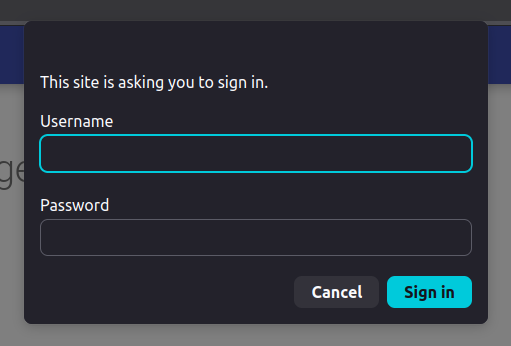
After you fill in the fields and press OK, browser sends the provided value back to server where your authenticator then does its job. In our example above it checks if username is user and password is pass, and if they are, you'll see "Private space here." text in your browser.
You also need to pass the realm parameter to the BasicAuthenticator. This may be used by a more complex implementations of the Basic Authentication scheme, but is usually just being used as a title of that dialog box that browser shows to collect your username and password. However, modern browsers, for security reasons, won't show the realm string in the dialog title anymore, so it is totally up to you what you do with that, if anything.
One more thing I want to so in this example is to add a "public" context, no username and password needed, that our HTTP server serves, and it is again going to be super simple:
server.createContext("/public", (exchange) -> {
  var response = "Public space here.\n".getBytes();
  exchange.getResponseHeaders().add("Content-Type", "text/plain");
  exchange.sendResponseHeaders( 200, response.length );
  var os = exchange.getResponseBody();
  os.write( response );
  exchange.close();
});
The /public context handler code looks almost exactly the same as for our /secure context handler, the main difference being that we do not set authenticator on this one, so it will be freely available to requesters.
You can also add the Handle404 handler to the / context. And maybe also add /stop context that stops the server just for good measure, but this time secure it by another BasicAuthenticator class that checks for username admin and password 12345. That'll show them, pesky hackers.
And that would be mostly the end of elaborate coding examples showing you how you can start with using the jdk.httpserver module and more specifically the com.sun.net.httpserver package. You can find the complete code for the above examples here.
Before we wrap this up, let me mention a few more things, no code this time, it would turn an already long article into a novel.
How you could make authentication more complicated (and useful)
It may not seem like you could do that much with the Authenticator and its one method, but you would be surprised. Or maybe not, I don't know you so, what do I know, right?
If you look at the authentication steps in the previous section, there are generally three cases that happen in the exchange between client and server when it comes to requesting a secured resource:
- request contains authentication/authorization data, server accepts the data and request as valid and sends the resource content back
- request contains authentication/authorization data, server rejects the data and request as invalid with
403or401or similar status code - request contains no authentication/authorization data, server rejects the request as invalid with
403or401or similar status code
The first two cases are straighforward enough, but the third one though opens the door, as intended, to start auth process itself. The start of the auth process is usually facilitated by the fact that server, besides sending back 403 or some other status code, also sends more data in the response headers indicating what kind of authentication/authorization scheme it accepts.
And the three classes implementing Authenticator.Result are designed to support those three general cases. Authenticator.Succes supports the first one, Authenticator.Failure the second and Authenticator.Retry the third. And it is expected that implementation of Authenticator also adds whatever response headers it needs to to the HttpExchange parameter in case when it decides to send Authenticator.Retry value.
In the case of BasicAuthenticator, the implementation will send WWW-Autheticate response header to indicate that it expects, and supports, an HTTP Basic Authetication to take place before it will allow access to the requested resrouce. You can see how that header is crafted in the OpenJDK 21 source code here.
There is a bunch of different HTTP authentication schemes to choose from, and I am not going to go into any kind of detail here about how to implement any of them. The only thing I'll need to say is that, if you, for whatever reason, aim to implement one or more of those, the start point would be the third case: your authenticator implementation returns Authenticator.Retry and sets appropriate header(s), namely at least the WWW-Authenticate header, for the chosen authentication scheme first step in its flow. And when client sends request again, your authenticate method will be called again, and you check if headers are present that your chose authentication scheme expects to be present in the request.
For example, if you are implementing OAuth 2.0, your initial response (i.e. to a request that has no auth headers) would be to send the client to authorization server, usually an identity provider. You accomplish this by returning Authenticator.Retry value with status code 302 and by setting the Location header to appropriate URL of the IdP, i.e. like so:
exchage.getResponseHeaders().set("Location","https://my-idp.example.com/auth?token=foo&this=bar&that=baz&location=https://my.server.example.com/secure/resource");
return new Authenticator.Retry( 302 );
The IdP URL would contain all the necessary information, like maybe token(s) and your server name or id and also maybe other stuff, for the IdP to start and complete authentication, and would typically include URL that the client should be redirected to once authentication has been successful. This URL is usually the resource client initially requested, but this time the request would contain necessaary authentication, and maybe authorization, info for your authenticate() method to find and check for validity and all that stuff.
I think this is clear enough to show that Authenticator only looks deceptively simple, and it in fact has all the base ingredients needed to implement any one of the standard HTTP authentication schemes.
Oh, one more thing...
This thing also has filters and filter chain
In fully fledged HTTP servers you must have came across the concept of filters. This is a piece of code, or middleware, that in some shape or form pre-processes and/or post-processes HTTP requests, that is, it does something to the request before context handler is executed and/or after context handler is executed.
Request pre-processing can be super useful, and authentication using the Authenticator class we visited above is a special case of a request filter implementation. You can code your own request filters using com.sun.net.httpserver.Filter class.
Post-processing filters are not that much useful, mainly because the request has already been sent and closed and done with, however they are useful for logging and similar kind of stuff.
The documentation for Filter contains basic examples of how to set up and use filters in the description of beforeHandler() and afterHandler() methods.
That's all I have to say about filters in this article, have fun.
There's HTTPS support too
All the samples above assume you will be using HTTP protocol for your server.
This is not a big deal in a few real-life cases, like for example if you will deploy your code inside a private network, i.e. a VPC or a LAN, and it'll only be available to clients from witin that private network, or if you deploy it behind a proxy like nginx which then handles the TLS part of HTTPS for you.
But if you really want to or need to, com.sun.net.httpserver package provides HTTPS variants of the key classes: HttpsServer and HttpsExchange, together with hepler classes specific to HTTPS setup: HttpsConfigurator and HttpsParameters. You can then use your own SSL certificate to secure connections to your Java server.
Bare-bones example code for that can be found in the com.sun.net.httpserver package summary.
There's a simple file server that comes with JDK that uses these same classes (duh)
And at the very end, as already mentioned, starting with Java 21, the jdk.httpserver module contains a class named SimpleFileServer as well as a CLI tool jwebserver, which can serve static content from a folder on your computer.
You can think of this tool as an equivalent of the Python's http.server module (python -m http.server) or the JavaScript's NPM package http-server.
You can run a simple Java HTTP file server by using either java -m jdk.httpserver (similar to the Python case) or jwebserver (similar to the NodeJS case) commands.
Hope this was an interesting and informative read and, yeah, go and build something cool with this little Java gem.
Peace.